

Skip to content

When your financial life outgrows your setup.

Bring your accounts, businesses, property, and family plans into one connected workspace. See what needs attention and work through what comes next.

A family sharing a kitchen counter, people at work in their business, and a neighbor returning to a city home.

Choose an example to follow through the page.

FamilyThe people you care forBusinessThe business you’re buildingPropertyThe things you own

Your accounts are separate.
Your life isn’t.

A change in one part of your life can raise questions elsewhere. The highlighted connections show what needs to be considered together.

Choose a highlighted connection to explore the example.
Read about your business

Business money becomes a household decision.

A distribution from your business · Illustrative household

The amount is only the beginning. The timing, the ownership, and the plans for that money belong in the same conversation.

Start with the owner

Harbor Works LLC

The operating agreement records the owners. A tax allocation can describe something different.

From: Operating agreement

The next question or stepWhich owners and agreement apply to this distribution?

With X1 Bring the business records and household context together, then prepare the questions that need an answer.

Follow this example in X1

You have the work
of a family office.
Build the support around it.

A business, properties, investments, family commitments. You can outgrow a spreadsheet and a good memory long before you have a team to run it all.

Use X1 to connect the records, questions, and responsibilities behind your decisions, with context you can return to as your life changes.

Today, you can use X1 to:

Bring the picture together

Connect selected accounts and records. See the businesses, property, and people they belong to.

Explore connections

Work through the questions

Ask about your information, review tax and estate documents, and prepare questions for the people helping you.

Inspect a saved product result

Keep the work moving

See upcoming household responsibilities and return to the records and decisions behind them.

Explore what’s ahead

Add information as you go. See what’s included before you begin.

Check the result
against the record.

You should be able to see where an answer comes from before you rely on it.

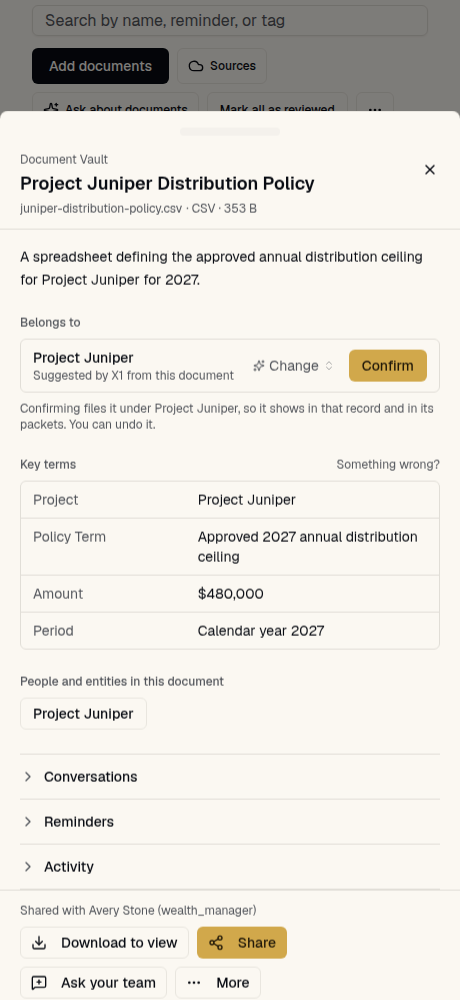
This is a saved result from X1, using a fictional distribution policy. Open the source and compare it with the terms X1 extracted. The screen alongside is from the actual app.

Compare the source and saved result

In the source

The approved annual distribution ceiling for Project Juniper in 2027 is $480,000. This document does not set a liquidity reserve or insurance premium.

In X1’s saved result

Project
Project Juniper
Policy Term
Approved 2027 annual distribution ceiling
Amount
$480,000
Period
Calendar year 2027

The source says distribution ceiling. The saved result keeps that distinction.

Fictional data, actual saved output. This sample shows document reading and suggested filing; it stops before confirmation or sharing. The household walkthrough below illustrates the broader work.

Generated October 1, 2026 · App screen captured October 7, 2026.

X1’s document inspector shows the Project Juniper distribution policy, its four extracted terms, and a suggested filing awaiting confirmation.
Saved app screen · Fictional example

A better question starts
with the full picture.

The business distribution · Illustrative X1 review

Keep the source, the household context, and the question together. Review what matters before bringing it to the person who can help.

How does this distribution affect the household’s next tax estimate?

See what needs attention next
Harbor Works LLCIllustrative example
Explore the example review

The records behind the question.

Sources together
2025 K-1 and operating agreement
Household context
Ownership and income allocation describe different things.
Still open
The CPA’s explanation still needs to be added.

You choose what to share. Your professional supplies the judgment.

See who owns what.
Find the records behind the question.

Stay with the Avery household and Harbor Works LLC. Their ownership records raise a question for their CPA. Follow this fictional example through to the draft they can review and share.

Explore the full household map
Household structureRepresentative example
ConfirmedNeeds explanation

Records

12

Levels

4

Needs review

1

Step 1 of 4: See the household before you isolate the issue.

Scroll across the map to explore the full household.

Household structureRepresentative example
ConfirmedNeeds explanation

Records

12

Levels

4

Needs review

1

Step 1 of 4: See the household before you isolate the issue.

See the household before you isolate the issue.

The S corp, the partnership, the rental, the trust, and what sits under each stay in one ownership picture.

Avery household

Representative example

A family trust, two businesses, a rental property, and the accounts and policies connected to them.

  • Avery Family TrustTrust
  • Avery Design CoS corporation
  • Cedar Lane LLCRental
  • Harbor Works LLCPartnership

Follow Harbor Works below to see how one ownership question reaches the account, the buy-sell policy, and the tax estimate.

Record types7Ownership paths2 into Harbor WorksOpen questionOne difference to explain

X1 doesn't flatten this into one unexplained total. The structure stays visible so you can check each detail against its original document.


Trace one partnership from its owners to what depends on it.

Both ownership paths and the account, the policy, and the estimate below the business stay visible together.

Primary ownership path

Avery household / Avery Design Co / Harbor Works LLC

Avery Design Co

60% recorded

Morgan Avery

40% recorded

The operating account, the buy-sell policy, and the Q3 estimate stay in the trace. The question isn't isolated from the records that depend on its answer.

See the difference and the documents behind it.

The agreement records ownership. The K-1 allocates income. Your CPA explains how they fit together.

Source 01

Operating agreement

Records Avery Design Co at 60% and Morgan Avery at 40%.

Source 02

2025 partnership K-1

Allocates the year's income 50/50.

Needs your CPA

Ask your CPA to explain the difference. Different figures alone do not establish an error. Nothing changes in the record yet.

Share the question. Keep the explanation.

In this example, you approve what goes to your CPA. Their reply helps you decide what to update in your household record.

Example reply from your CPA.

You approve what goes to your CPA

You choose the recipient and the supporting documents to share.

Your CPA explains the difference

In this example, your CPA explains ownership and income allocation before you confirm the record.

You confirm the record and keep the explanation

The decision, both documents, the partnership, the account, the policy, and the estimate stay together.

Sharing and record changes each need your approval.

A date on a calendar
is only half the story.

What’s coming up? Who is responsible? What’s still missing? See the next 90 days with the household behind them.

The business distribution · Illustrative plansToday → Next 90 days
Explore an upcoming responsibility

What does the difference mean?

The agreement and K-1 are together, but the meaning of the different percentages still needs confirmation.

Source: Operating agreement and K-1

The next step

Review the question before sharing the selected records with your CPA.

Membership includes Household Readiness and a Weekly Brief. Review upcoming work here and return to it in your weekly update. Coverage depends on the records and connections you add. Example dates are planned check-ins, not verified deadlines.

Explore Household Readiness
A family and professionals sharing a table, with one chair still open.

Good advice still needs
someone to join the dots.

The business distribution · Illustrative household

Bring the ownership records and planned household payment into the same conversation with your CPA.

You may already have people you trust. You may be figuring out what help you need. X1 gives you a place to organize the context and prepare better questions, so the gaps are easier to name.

X1 is software. Professional advice and services are separate. You choose what to share and who gets access.

How X1 works with professionals

Your next decision shouldn’t start from scratch.

Keep the records, the reason for a decision, and the questions still open. Move this example six months ahead to see what the household can return to.

Explore the household history
Harbor Works LLCToday · Illustrative history

A decision worth keeping.

In this example, the household records its decision and why it matters.

Sources kept together

2025 K-1 and operating agreement

Kept
The decision and its reason

Wait for the CPA’s explanation before using either percentage in the estimate.

The agreement and K-1 serve different purposes.

Kept
The unanswered question

The CPA’s explanation still needs to be added.

Still open

An open question stays open until someone resolves it. Keeping the context makes it easier to return.

Start with the accounts
and tools you already use.

Bring your financial picture together without changing where you bank or run your business. Connect the accounts and records you choose, and add more as you go.

Bank, brokerage, and loan accounts
QuickBooksYour business books, on the household record
Google DriveBring selected files into X1
DropboxBring selected files into X1
Bring selected files into X1
SlackAsk X1 from Slack, for professionals
EmailReply by email and it lands in X1
FathomMeeting summaries, for professionals

With assistant access on your X1 account, you can use your saved record in Claude, Claude Code, ChatGPT or Codex. Muse is available for professional accounts. Your assistant’s own plan and settings apply. See assistant setup and requirements

Start free inside X1 to save documents and ask questions from your record. Connecting an assistant requires assistant access on your X1 account. Start free in X1

See everything X1 connects to

Available connections depend on your membership and provider. Choose what to connect in your account settings. A connection only covers the information you authorize; it does not give X1 permission to move money.

Bring your life as it is.
Add the pieces as you go.

You don’t have to gather everything before you begin. Start organizing your household, then choose the tools and connections you need.

What can I do for free, and what does membership add?

Create a free account and add your documents, up to 1 GB, and X1 prepares supported files for search. Ask X1 answers from your own documents, up to 20 requests every 30 days in X1. Download your originals and export your supported record.

Membership adds automatic document organization under the business, trust, property, or person each document belongs to, tax and estate document reviews, the Weekly Brief, live bank connections, and more capacity: $97 a month or $997 a year.

Plans and pricing
Do my professionals need an X1 account?

You can keep working with your own CPA, attorney, or advisor. For supported email handoffs, they can receive the question and selected material and reply by email without creating an X1 account. You review what to share before sending it.

Professionals who want to use X1 across their practice can have their own account.

X1 for professionals
Who can see my documents?

Access follows roles, household relationships, and the sharing permissions you grant. Authorized X1 staff and service providers may also process information to run and secure the service.

The security page explains who can access documents, which providers process them, model training, deletion, and export, including current limits.

Read the data-handling answers
Can I use it from Claude or ChatGPT?

With assistant access on your X1 account, you can use your saved record in Claude, Claude Code, ChatGPT or Codex. Muse is available for professional accounts. Your assistant’s own plan and settings apply.

Start free inside X1 to save documents and ask questions from your record. Connecting an assistant requires assistant access on your X1 account.

See assistant setup and requirements

From an X1 customer

“I'm building my virtual family office on X1. It's what I wished existed when I started advising families twenty years ago.”

Garrett Gunderson

Author of Killing Sacred Cows. Paying X1 customer.

Your financial life belongs to you.

Read the X1 manifesto

You shouldn’t have to explain your financial life from the beginning every time someone new helps you.

The records you gather, the decisions you make, and the reasons behind them should keep helping your household as your life changes and new people join the conversation.

You keep control of consequential decisions. Connect only what you choose and review before sharing. X1 doesn’t trade or move money. Your professionals bring their judgment.

Keep building
your life.

Bring the moving parts together. Your accounts, businesses, property, and family commitments belong in the same picture, with the context to work through what comes next.

Create your free household workspace. You can add information as you go, without gathering everything first.

Get started with X1

Free account with up to 20 Ask X1 requests every 30 days. Membership adds document organization, tax and estate document reviews, and the Weekly Brief. See plans and pricing.

Three generations spending an afternoon together on their front steps, fixing a bicycle.
The business. The family. The next chapter.